> For the complete documentation index, see [llms.txt](https://utmify.gitbook.io/central-de-ajuda/llms.txt). Markdown versions of documentation pages are available by appending `.md` to page URLs; this page is available as [Markdown](https://utmify.gitbook.io/central-de-ajuda/help-center/configuring-utms-in-ads/setting-up-utm-code-in-my-ads/tiktok-ads.md).
# TikTok Ads
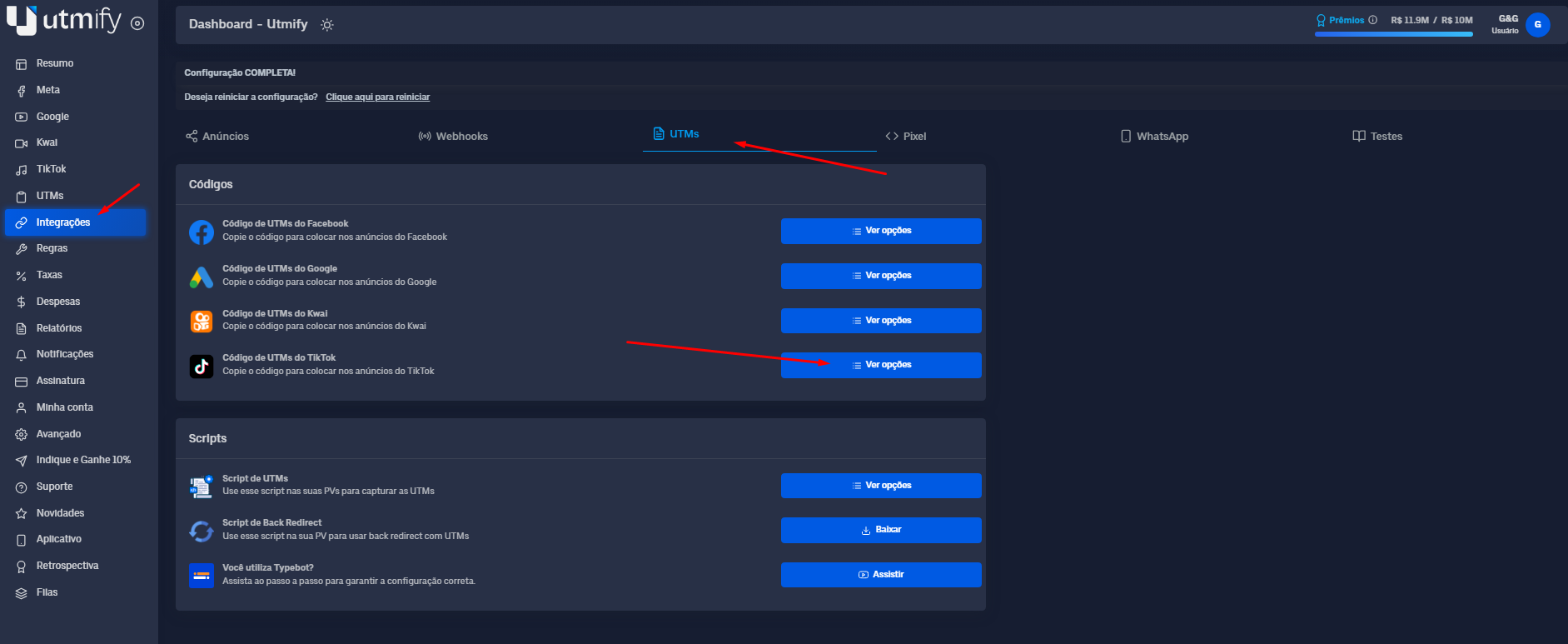
1. In the **Integrations** tab, click **UTMs** and copy the **UTM** code to **TikTok Ads:**
> TikTok Ads UTM Code
> \
> **(For users using Hotmart)**
```html
?utm_source=tiktok&utm_campaign=__CAMPAIGN_NAME__|__CAMPAIGN_ID__&utm_medium=__AID_NAME__|__AID__&utm_content=__CID_NAME__|__CID__&utm_term=__PLACEMENT__&xcod=tiktokhQwK21wXxR__CAMPAIGN_NAME__|__CAMPAIGN_ID__hQwK21wXxR__AID_NAME__|__AID__hQwK21wXxR__CID_NAME__|__CID__hQwK21wXxR__PLACEMENT__
```
> TikTok Ads UTM Code
> \
> **(For users using Cartpanda)**
```html
?utm_source=tiktok&utm_campaign=__CAMPAIGN_NAME__|__CAMPAIGN_ID__&utm_medium=__AID_NAME__|__AID__&utm_content=__CID_NAME__|__CID__&utm_term=__PLACEMENT__&cid=29567261371
```
> TikTok Ads UTM Code
> \
> **(For users using other sales platforms)**
```html
?utm_source=tiktok&utm_campaign=__CAMPAIGN_NAME__|__CAMPAIGN_ID__&utm_medium=__AID_NAME__|__AID__&utm_content=__CID_NAME__|__CID__&utm_term=__PLACEMENT__
```
{% hint style="warning" %}
Note: We do not recommend using the characters | # & ? in the nomenclature of your campaigns. This is a reserved character that we use as a separator for UTMs, as its use can hinder the marking of your campaigns in the Utmify dashboard.
{% endhint %}
2. Go to the Campaigns tab, then TikTok Ads Ads, select the ads you want to add, and click Edit.
3. Scroll down to the **Destination URL** option and add, right after your website URL, the Cloaker **UTMs + parameter code.**
.png)
.png)