> For the complete documentation index, see [llms.txt](https://utmify.gitbook.io/central-de-ajuda/llms.txt). Markdown versions of documentation pages are available by appending `.md` to page URLs; this page is available as [Markdown](https://utmify.gitbook.io/central-de-ajuda/help-center/configuring-utms-in-ads/setting-up-utm-code-in-my-ads/meta-ads.md).
# Meta Ads
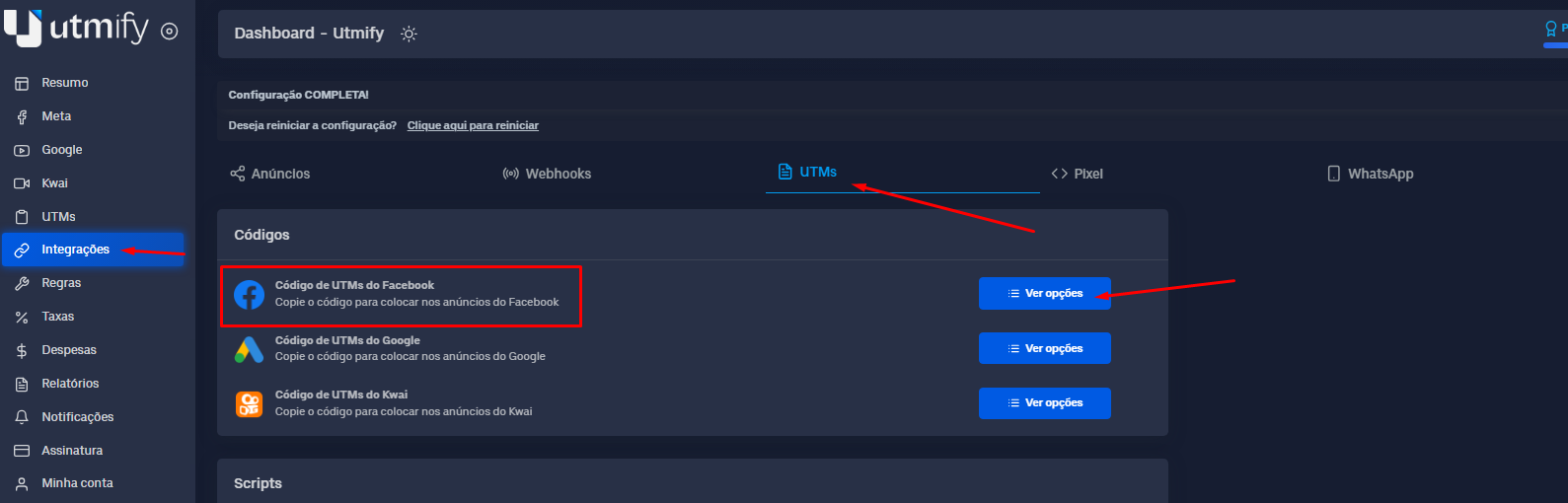
1. In the **Integrations** tab, click **UTM**s and copy the code from **UTMs** to **Meta Ads**:
Code of UTMs - Meta Ads
> Meta Ads UTM Code
> \
> **(For users using Hotmart)**
```html
utm_source=FB&utm_campaign={{campaign.name}}|{{campaign.id}}&utm_medium={{adset.name}}|{{adset.id}}&utm_content={{ad.name}}|{{ad.id}}&utm_term={{placement}}&xcod=FBhQwK21wXxR{{campaign.name}}|{{campaign.id}}hQwK21wXxR{{adset.name}}|{{adset.id}}hQwK21wXxR{{ad.name}}|{{ad.id}}hQwK21wXxR{{placement}}
```
> Meta Ads UTM Code
> \
> **(For users using Cartpanda)**
```html
utm_source=FB&utm_campaign={{campaign.name}}|{{campaign.id}}&utm_medium={{adset.name}}|{{adset.id}}&utm_content={{ad.name}}|{{ad.id}}&utm_term={{placement}}&cid=77407015180
```
> Meta Ads UTM Code
> \
> **(For users using other sales platforms)**
```html
utm_source=FB&utm_campaign={{campaign.name}}|{{campaign.id}}&utm_medium={{adset.name}}|{{adset.id}}&utm_content={{ad.name}}|{{ad.id}}&utm_term={{placement}}
```
***
{% hint style="warning" %}
Note: We do not recommend using the characters | # & ? in the nomenclature of your campaigns. This is a reserved character that we use as a separator for UTMs, as its use can hinder the marking of your campaigns in the Utmify dashboard.
\
If you use it, you will need to create new campaigns with different nomenclatures, because even if you change and publish again, Meta Ads will continue to use the old nomenclature with special characters.
{% endhint %}
2. Then open your **Meta** ad manager and in your ads, click to edit:
In the **Destination** field, leave only your page **URL**:
* Under **URL Parameters**, enter the **UTM** code copied into **Utmify**:

3. If you use Cloaker, follow the process below:
📍[Meta Ads + Cloakers](/central-de-ajuda/help-center/configuring-utms-in-ads/setting-up-utm-code-in-my-ads/configuring-utm-code-with-cloakers/meta-ads-+-cloakers.md)
4. Finally, simply follow this same process for all your ads.